
HarmonyOS 5
HUAWEI MatePad Mini complete info


HUAWEI has introduced the all-new MatePad Mini tablet, in China. As per the specifications, the device is 5.1mm thin, weighs 255g, and boasts an 8.8″ 2.5K 120Hz OLED screen with 2.99mm narrow bezels.
It has support for the HUAWEI M-Pencil Pro, runs HarmonyOS 5.1, has a 3D heat dissipation architecture for cooling, has SIM card support, and has a 6400mAh battery with 66W fast charging support.
It also features a dual rear camera setup consisting of a 50MP main camera and an 8MP ultra-wide camera with macro mode, along with a single 32MP front-facing camera. These are paired with AI photo editing features. Like other HUAWEI phones, the chipset hasn’t been revealed, but it is most likely powered by HUAWEI’s own Kirin 9010 SoC, based on earlier reports.
HUAWEI MatePad Mini Specifications:
- 8.8-inch 2.5K (2560 × 1600 pixels) OLED screen, 120Hz refresh rate, 92% Screen-to-body ratio, 1800 nits peak brightness, 1.07 billion colors
- HUAWEI Kirin SoC (speculated)
- 12GB / 16GB RAM with 256GB / 512GB / 1TB storage
- Rear Cameras: 50MP camera (f/1.8 aperture), 8MP wide-angle camera with macro mode (f/2.2 aperture), LED flash
- Front Camera: 32MP (f/2.4 aperture)
- Stereo speakers
- HarmonyOS 5.1
- Single SIM
- Cellular network support, Wi-Fi 7 (2.4 GHz and 5 GHz), Bluetooth 5.2 LE, GPS/GLONASS/BeiDou/Galileo/WLAN network positioning/cellular network positioning
- 6400 mAh battery with 66W fast charging support
The HUAWEI MatePad Mini comes in Spruce green, obsidian black, and snowy white colors and is priced at CNY 3899 (USD 545 / Rs. 48,120 approx.) for the 12+256GB variant, CNY 4399 (USD 615 / Rs. 54,280 approx.) for the 12+512GB variant, and CNY 4899 (USD 685 / Rs. 60,450 approx.) for the soft light version with matte screen.
There is also a special HUAWEI MatePad Mini Collector’s Edition in Global Red, bundled with a few accessories. It is priced at CNY 5,999 (USD 839 / Rs. 74,040 approx.) for the 16GB + 512GB variant and CNY 6,499 (USD 909 / Rs. 80,210 approx.) for the 16GB + 1TB variant.


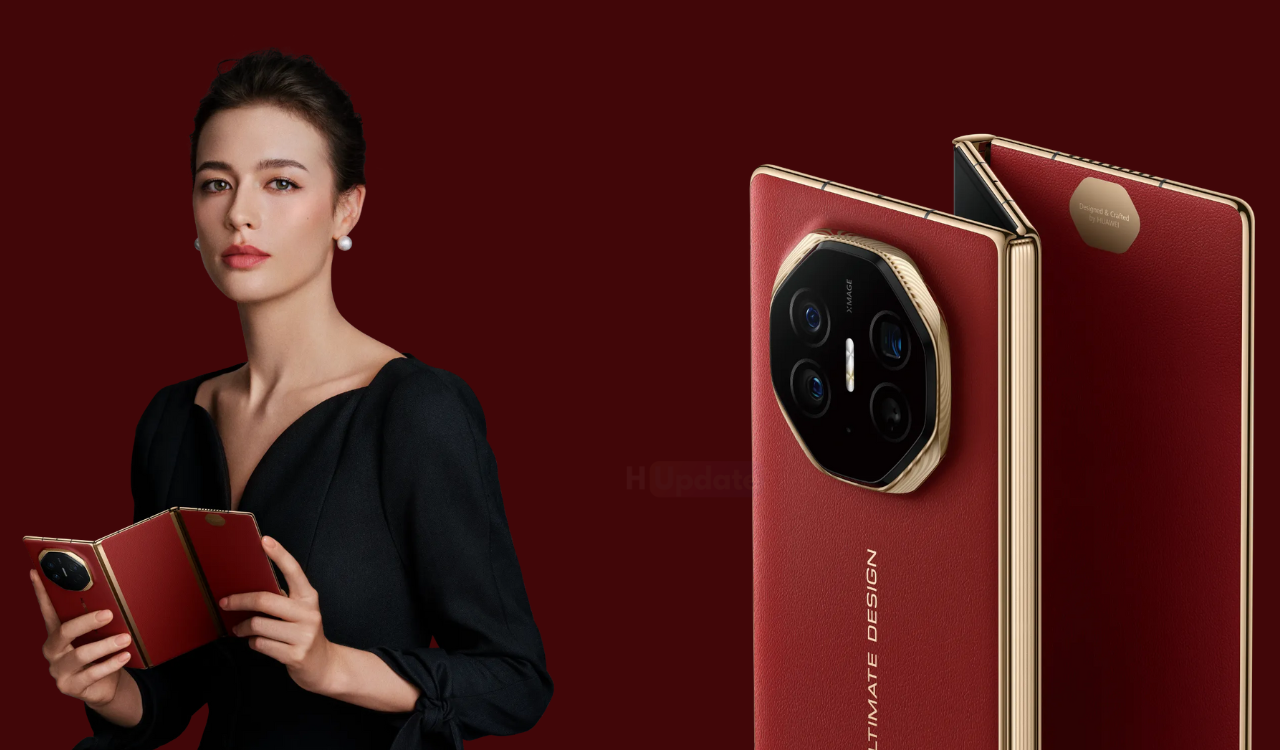
Huawei has started rolling out the HarmonyOS 5.1.0.128 SP5 update to its Mate XT tri-fold phone. The system package size is about 1.90GB, bringing more new features and experiences.
For example, the live window will receive a new upgrade in visuals and motion effects, while covering more life scenarios; the AI photo editing function of the gallery will add magic image transfer and portrait refinement functions.
Version push time
July 29, 2025: Unlimited upgrades from 5.0.1.130SP8 to 5.1.0.128SP5 are available . Go to Settings > Tap your device name > Check for updates. If your device hasn’t yet been upgraded to HarmonyOS 5, it’s recommended to upgrade first through My Huawei App > Upgrades > (Multi-device Upgrades) and then upgrade to 5.1.0.128SP5 through Settings > Tap your device name > Check for updates.
Compatible models
HUAWEI Mate XT | ULTIMATE DESIGN ( GRL-AL10 )
Version Changelog
Update points from 5.0.1.130SP8 to 5.1.0.128SP5:
Live Window
The visual and dynamic effects are completely upgraded, the live window is displayed in the center , the real-time information flow and the camera hole are cleverly combined, the key information is in the visual focus, the amount of text information on the left and right has doubled, and the delivery status of the takeaway order, the license plate number of the taxi and other information are clear at a glance
Covering more life scenarios, supporting multi-task display and interaction , and obtaining information more efficiently
Gallery
New Magic Image Shift function , you can freely drag, scale or copy the elements in the photo you have taken. You can easily adjust the relationship between the elements and the background without professional cutout tools, and easily achieve creative composition (Gallery Edit > AI Photo Editing)
New portrait retouching function , AI intelligently analyzes portrait scenes, automatically optimizes lighting and composition effects, making your portrait photos more outstanding (Gallery Edit > AI Retouching)
Support adding gallery cards on the desktop for quick browsing of albums
Theme
Supports the use of the silly dance theme shared from the HUAWEI Pura80 series
Xiaoyi
Supports the Creative Studio agent. Provide a text to describe the picture. The Creative Studio agent can draw a variety of imaginative pictures for you (Xiaoyi App > Discover > Agent > Creative Studio)
Supports Xiaoyi Photo Studio intelligent agent, which can generate your own exquisite creative photos through templates of various styles, experience different hairstyles, travel through different time and space, realize various “what ifs”, and experience various parallel lives without leaving home (Xiaoyi App > Discover > Intelligent Agent > Xiaoyi Photo Studio)
Supports Xiaoyi’s deep problem-solving intelligent body, which has multiple functions such as photo-taking and problem-solving, homework correction, etc. It is a parent tutoring assistant that helps improve learning efficiency throughout the whole process
System
Notification center supports batch management of notifications (Settings > Notifications and Status Bar)
Optimize the document recognition capability of Huawei payment upload
Optimize the smoothness of dragging large files between Huawei Windows PC and mobile phone
Lock screen
Optimize the smoothness of sliding messages left and right on the lock screen
Recording
Support multiple applications to record at the same time
Game
Optimize the stability and fluency of the game engine to enhance the gaming experience
Wallet
Wallet card swiping is connected to the new live window . Card swiping status such as transportation cards, access cards and car keys will be presented in the form of live window cards, with key information displayed locally, and light reminders are more comfortable
Calendar
Subscription service supports subscription to “This Day in History” (Sidebar > Subscription Service > Manage)
Added illustration background to solar term cards in month view (Calendar Settings > Other Calendars > Chinese Lunar Calendar)
Accessories
Smart voice broadcast in headphones
Connect to Huawei headphones to support live window information broadcasting of travel applications, such as taxis and boarding. When the vehicle arrives or boarding starts, the headphones will automatically play reminder messages, making it easy to cope with busy lives
Connecting Huawei headphones supports integrated broadcasting of long text notification messages received by the phone in scenarios such as travel, takeout, and payment, so that only key information is obtained without internal consumption.
HiCar Shake App Flow
After connecting to HiCar, when the “transferable” live window appears on the mobile application interface, shake the phone and the page content can be transferred to the car screen display.

Harmony-OS powered Huawei MateBook Pro device is now receiving the HarmonyOS 5.0.1.315 SP36 version upgrade. The system upgrade package size is about 1.44GB.
According to the description, the new version optimizes the operation experience of scenes such as storage racks, returning to the desktop, opening and closing the computer, and the interface display effects in various scenes.
Huawei MateBook Pro HarmonyOS 5.0.1.315 Update Info [Translated]
Desktop
Optimize the operation experience of dragging storage folders, etc.
Optimize browser shortcut experience
Optimize the stability of extended screen scenes and the display effects of some interfaces , fix the problem that the Dock bar cannot be displayed in the immersive window, and the setting options change abnormally after opening and closing the computer.
Fixed the issue where the layout of the folder and desktop would be incorrect after deleting the application.
Fixed the issue of abnormal display of some interfaces in multi-user scenarios.
Fixed the issue that the video file icon displayed abnormally after renaming the video file.
Fixed the issue where the interface displayed abnormally when swiping up with three fingers to return to the desktop.
Fixed the issue where removing the app icon from the Dock failed in some scenarios.
File Management
Optimize file display effects and file operation experience in file management.
Fixed the issue where the browser would automatically open a web page when opening a file in the file manager.
Fixed the issue where some external storage devices could not be accessed in certain scenarios.
Changlian
Optimize the user experience of Changlian.
Text Editor
Optimize the problem of text editing and saving failure in some scenes.
Xiaoyi
Optimize Xiaoyihui audio recording experience.
theme
Optimize desktop animation experience for some theme scenes.
application
Optimize the compatibility of some third-party applications.
Optimize the screenshot experience of some applications or scenes.
Optimize the stability of some applications.
system
Improve the stability and performance of the whole machine, providing you with a smoother operating experience.
Optimize the operating experience of booting after sleep, using an external keyboard and mouse, and tapping the touchpad with two fingers.
Optimize the touch screen operation experience in web browsing scenarios.
Optimize network stability in some scenarios to improve Internet experience.
Fixed the issue that the HyperTerminal does not support HUAWEI SOUND in some scenarios.
Fixed the problem of some fonts failing to install.