
Huawei News
Huawei DevEco Studio 3.0 Beta 3 released

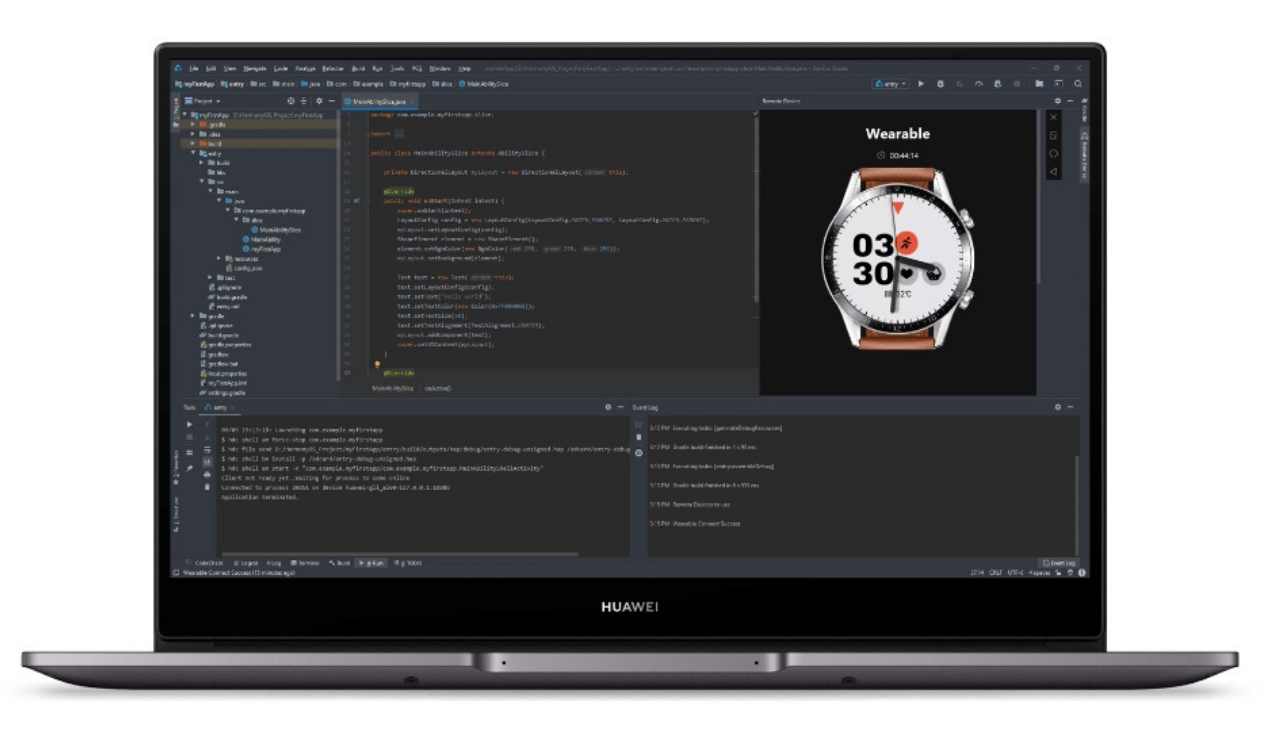
According to the latest information, Huawei DevEco Studio (referred to as DevEco Studio) is a one-stop integrated development environment (IDE) for developing HarmonyOS applications and atomization services, providing developers with project template creation, Develop, compile, debug, release and other functions.
Now, Huawei DevEco Studio 3.0 Beta 3 has been released, the first version developed to support OpenHarmony applications and services.
Version Change Description
DevEco Studio 3.0 Beta3 is the first version to support OpenHarmony application and service development, with the following capabilities:
Support one-stop information acquisition platform
Based on the user journey that developers understand, learn, develop, and ask for help, we provide a one-stop information acquisition platform in DevEco Studio: OpenHarmony Information Center. This version is the first to go online and currently supports the following capabilities:
Provide OpenHarmony application development quick start, DevEco Studio release notes, content integration of FAQs, and experience immersive information reading experience.
Support online browsing and one-click creation of Sample
It supports the in-depth integration of document content and DevEco Studio functions. During the process of reading the document, you can pull up the corresponding functions of DevEco Studio and reach it with one click.
Support anonymous feedback from developers, your comments will be an important source of input for our DevEco Studio and documentation improvements.
Support the rapid acquisition of relevant resources during the development of OpenHarmony applications, and improve the efficiency of information acquisition.
Provide multi-device engineering templates
Project templates facilitate application development. Based on the declarative development paradigm and web-like development paradigm, DevEco Studio provides OpenHarmony developers with multi-device project templates and supports cross-device development. When developing an application/service, after the developer creates a project according to the wizard, DevEco Studio will automatically generate sample code and related resources. After the project is synchronized, it can be run directly. The developer does not need to type code from scratch, and can quickly get started.
Efficient code editing
In the stage of writing application or service code, using common code skills can improve coding efficiency. DevEco Studio provides various common skills such as code highlighting, code folding, and code formatting, and supports Lenovo completion, code jumping, code verification, etc., to achieve efficient code editing.
Support visual interface UI development
OpenHarmony low-code development provides an efficient visual design method, has rich UI interface editing functions, its interface and logic are separated, supports free drag & drop of various components, quick preview effects, what you see is what you get, and supports cards Zero-code development effectively improves the efficiency of building UI interfaces. Developers can choose to enable Super Visual when creating a project, enable the low-code development function, and open the “.visual” file in the project directory structure to design and develop the visual layout of the page.
Real-time preview: In the process of developing UI code, if you add or delete UI components, you just need to Ctrl+S to save, and the previewer will immediately refresh the preview results.
Dynamic preview: In the previewer interface, you can operate the interface interaction actions of the application/service in the previewer, such as click events, jumping, sliding, etc., which is consistent with the interface interaction experience of the application/service running on the real device.
Multi-device preview: Supports viewing the UI layout and interaction effects of applications/services on different devices, and supports up to 4 devices at the same time. Click the button in the upper right corner of the Previewer to turn on the Multi-profile preview switch in Profile Manager, and then you can view the running effect of applications/services on multiple devices at the same time.
Component preview: Support eTS component preview by adding the annotation @Preview in front of the component. In a single source file, you can use up to 10 @Preview to decorate custom components.
Brand new compilation tool Hvigor
For OpenHarmony-oriented JS/eTS development, based on the compiling, packaging and package management technologies in the JS field, DevEco Studio provides the automated build tool Hvigor to realize one-click automated construction of OpenHarmony applications/services.
Hvigor is a new front-end lightweight construction tool based on TS. Combined with the npm package management mechanism, it mainly provides key capabilities such as task management mechanism, task registration and scheduling, project model management, configuration management, and new command line entry, which is more in line with openHarmony Development habits of TS/JS developers.


Huawei is getting ready to release a new super-thin phone called the Mate 70 Air. Some details about this phone have already been leaked online, and now a new picture has appeared showing what it looks like.
What the phone looks like
A promotional poster for the Huawei Mate 70 Air was leaked today. The phone looks similar to other phones in Huawei’s Mate 70 family, but it’s much thinner.
The back of the phone has a round camera area with Huawei’s XMAGE camera logo on it. The edges of the phone appear to be shiny and polished. The back cover has a textured surface, similar to another Huawei model called the Mate 70 Pro+.
What’s inside the phone
There isn’t much information available yet, but the Mate 70 Air might be a mid-priced phone. Early reports said it would have 12GB of memory and either 256GB or 512GB of storage space. However, newer information suggests it will actually have 16GB of memory.
The phone is expected to have a large 6.9-inch screen. It will also have a high-quality main camera.
Other features
Unlike Apple’s iPhone Air, the Huawei Mate 70 Air will have a slot for a physical SIM card. The phone will run on Huawei’s HarmonyOS 5.1 software. It will come in three colors: black, white, and gold.
Huawei is expected to launch this phone in November, around the same time as its Mate 80 series.

Tipster Digital Chat Station has confirmed that the Chinese tech giant Huawei will release new phones called the Mate 80 series in November. These new phones will have better designs, cameras, and speed.
The company is expected to compete with Apple’s new iPhone 17 phones. Huawei will make four different Mate 80 phones: the regular Mate 80, Mate 80 Pro, Mate 80 Pro+, and Mate 80 RS. Each phone will have different cameras. The regular Mate 80 will have a 50-megapixel camera.
The Pro version will have a bigger 50-megapixel camera. The Pro+ and RS models will have even bigger 50-megapixel cameras.
The Pro model might have a flat screen and face recognition. The Pro+ and RS models might have curved screens that bend more.
The best phone, the Mate 80 RS, might have a 6.9-inch screen with special technology.
This screen should be brighter, use less battery power, and last longer than normal phone screens. Huawei might also use strong titanium metal for the frame and special glass on the back. Inside the phones, there will be a new chip called the Kirin 9030. The battery might be bigger than 6000mAh and charge very fast – 100W with a wire and 80W without wires. The phones might work with 5G internet and satellite communication.
The phones will use Huawei’s own software called HarmonyOS. This might work better with other Huawei devices and have more AI features. Some people think these improvements will help Huawei compete better with Apple, especially in battery life, communication, and smart features.

A Chinese company called HiSilicon Semiconductor just changed who’s in charge. The old boss, Xu Zhijun, stepped down from his job as the legal representative and chairman. Now the company’s CEO, Gao Ji, is taking over these roles.
Xu has been working at Huawei since 1993 and still has other important jobs there – he’s a vice chairman and sometimes serves as the rotating chairman. Him leaving this position is probably just Huawei moving people around to different jobs within the company.
HiSilicon is completely owned by Huawei and makes computer chips. This change in leadership might mean Huawei is trying to make things work better.
HiSilicon started in October 2004 when Huawei took its computer chip design team and turned it into its own company. The main office is in Shenzhen, but they also have offices in Beijing, Shanghai, and other cities in China.