
News
OpenHarmony 3.0 LTS: Check these new features of the standard system


OpenHarmony 3.0 LTS version was recently released. According to the latest information, the Open Source Foundation and the Eclipse Foundation, the largest open-source organization in Europe, signed a strategic agreement on September 28 to establish a partnership to jointly build a global open source community and will focus on OpenAtom’s OpenHarmony operating system. Compared with the previous version, check the new features of the standard system below.
OpenHarmony 3.0 LTS Features:
- The user program framework supports ServiceAbility (DataAbility) and threading model.
- Support file security access, that is, the ability to convert files into URIs and resolve URIs to open files.
- Support the basic ability of device management PIN code authentication.
- Support the basic capabilities of relational databases and distributed data management.
- Support Ark JS compilation tool chain and runtime, support OpenHarmony JS UI framework application development and operation.
- Support remote binding ServiceAbility, FA cross-device migration capabilities.
- Support application notification subscription and application notification message redirection capabilities.
- Support the input method framework and support the input of basic English letters, symbols and numbers.
- The camera application supports the basic capabilities of previewing, photographing and video recording.
- Support CS basic call and GSM short message capabilities.
- Support timer capability and provide timing time zone management capability.
- Under the distributed networking between standard devices, it provides the permission verification function when the application accesses the resources or capabilities of the opposite end across devices.
- Use the National Day holiday to experience the new version of the standard system.
Prepare
Ubuntu set up a development environment refer to the official website 1 , the official website 2
development tools HUAWEI DevEco Device Tool, 2.2 Beta2, download
Source code acquisition
Registration code cloud gitee account.
Registration code cloud SSH public key, refer to Code Cloud Help Center
Configure user information.
Create a new source code folder OpenHarmony_3.0, and use repo + ssh to download the source code to the folder.
Execute the script in the source directory OpenHarmony_3.0, install the compiler and binary tools
Compile and burn
In DevEco Device Tool, select “Import Project” on the “Homepage” to open the OpenHarmony_3.0 folder, MCU select Hi3516DV300 under “HiSilicon_Arm_Linux”, and select “Ohos-sources” for the compilation framework.
Connect the computer and the serial cable and network cable of the Hi3616 development board, and turn on the power.
After importing the project, the project configuration page is automatically opened.
On the “hi3516dv300” tab, set the compilation options and select “release”.
On the “hi3516dv300” tab, set the burning options, including upload_partitions, upload_port, and upload_protocol.
—-Upload_partitions burns the partition table by default, and burns fastboot, boot, updater, misc, system, vendor and userdata at the same time.
—-upload_port: Click the selection box of the serial port number to automatically appear and select it (need to have the serial port driver installed)
—-upload_protocol: burn protocol, select “hiburn-net”.
—-upload_net_server_ip: Click the selection box to automatically appear and select, the machine is “192.168.0.100”, after selection, the following three upload_net_client_mask subnet mask, upload_net_client_gw gateway, upload_net_client_ip development board IP address will automatically fill in the IP, Use the default value.
After setting, click Save and open the project at the upper right of the project configuration tab. Ready to compile.
Open the “PROJECT TASK” of the DevEco Device Tool and the “Build” under the development board of the project directory “hi3516dv300” to start the compilation. It takes more than 20,000 steps. The compilation takes a long time, so wait patiently.
The image output of the compilation result is under the directory of out/ohos-arm-release/packages/phone/images/. There are more than 3G in total, and the files are larger. The subsequent burning time will be doubled compared with the previous version.
Open “Upload” under “PROJECT TASK” and “hi3516dv300” development board in the project directory, and start burning. Because of the large image file, pre-processing before burning is slow. After a long wait, power off and restart the development board as prompted . I hope that subsequent versions can improve the speed of preprocessing, or give a progress bar and prompts in the IDE.
After restarting, burning will begin. After burning, the 3516 will restart automatically. After restarting, it will enter the boot interface.
You can also burn the burned files in the out/ohos-arm-release/packages/phone/images directory under Windows with HiTool under the network port. It takes about 20 minutes, which is much faster than under DevEco Device Tool.
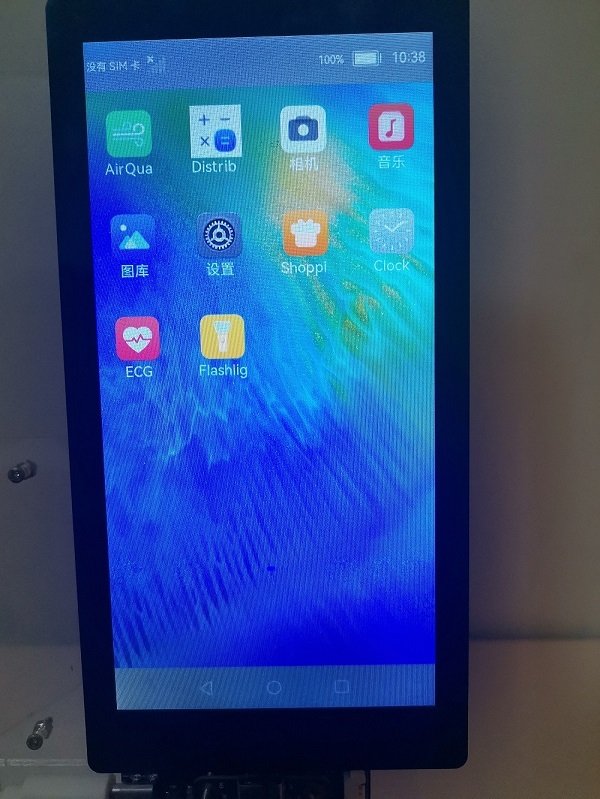
Compared with OpenHarmony v2.2 Beta2, “No SIM card” is displayed in the upper left corner of the boot interface screen, and the “Camera” application is added to the desktop, which can take pictures, videos, and display previews. The features and functions of the new version are waiting for developers to continue to experience.
Source – Community



Tipster Digital Chat Station has confirmed that the Chinese tech giant Huawei will release new phones called the Mate 80 series in November. These new phones will have better designs, cameras, and speed.
The company is expected to compete with Apple’s new iPhone 17 phones. Huawei will make four different Mate 80 phones: the regular Mate 80, Mate 80 Pro, Mate 80 Pro+, and Mate 80 RS. Each phone will have different cameras. The regular Mate 80 will have a 50-megapixel camera.
The Pro version will have a bigger 50-megapixel camera. The Pro+ and RS models will have even bigger 50-megapixel cameras.
The Pro model might have a flat screen and face recognition. The Pro+ and RS models might have curved screens that bend more.
The best phone, the Mate 80 RS, might have a 6.9-inch screen with special technology.
This screen should be brighter, use less battery power, and last longer than normal phone screens. Huawei might also use strong titanium metal for the frame and special glass on the back. Inside the phones, there will be a new chip called the Kirin 9030. The battery might be bigger than 6000mAh and charge very fast – 100W with a wire and 80W without wires. The phones might work with 5G internet and satellite communication.
The phones will use Huawei’s own software called HarmonyOS. This might work better with other Huawei devices and have more AI features. Some people think these improvements will help Huawei compete better with Apple, especially in battery life, communication, and smart features.

A Chinese company called HiSilicon Semiconductor just changed who’s in charge. The old boss, Xu Zhijun, stepped down from his job as the legal representative and chairman. Now the company’s CEO, Gao Ji, is taking over these roles.
Xu has been working at Huawei since 1993 and still has other important jobs there – he’s a vice chairman and sometimes serves as the rotating chairman. Him leaving this position is probably just Huawei moving people around to different jobs within the company.
HiSilicon is completely owned by Huawei and makes computer chips. This change in leadership might mean Huawei is trying to make things work better.
HiSilicon started in October 2004 when Huawei took its computer chip design team and turned it into its own company. The main office is in Shenzhen, but they also have offices in Beijing, Shanghai, and other cities in China.

HUAWEI has introduced the all-new MatePad Mini tablet, in China. As per the specifications, the device is 5.1mm thin, weighs 255g, and boasts an 8.8″ 2.5K 120Hz OLED screen with 2.99mm narrow bezels.
It has support for the HUAWEI M-Pencil Pro, runs HarmonyOS 5.1, has a 3D heat dissipation architecture for cooling, has SIM card support, and has a 6400mAh battery with 66W fast charging support.
It also features a dual rear camera setup consisting of a 50MP main camera and an 8MP ultra-wide camera with macro mode, along with a single 32MP front-facing camera. These are paired with AI photo editing features. Like other HUAWEI phones, the chipset hasn’t been revealed, but it is most likely powered by HUAWEI’s own Kirin 9010 SoC, based on earlier reports.
HUAWEI MatePad Mini Specifications:
- 8.8-inch 2.5K (2560 × 1600 pixels) OLED screen, 120Hz refresh rate, 92% Screen-to-body ratio, 1800 nits peak brightness, 1.07 billion colors
- HUAWEI Kirin SoC (speculated)
- 12GB / 16GB RAM with 256GB / 512GB / 1TB storage
- Rear Cameras: 50MP camera (f/1.8 aperture), 8MP wide-angle camera with macro mode (f/2.2 aperture), LED flash
- Front Camera: 32MP (f/2.4 aperture)
- Stereo speakers
- HarmonyOS 5.1
- Single SIM
- Cellular network support, Wi-Fi 7 (2.4 GHz and 5 GHz), Bluetooth 5.2 LE, GPS/GLONASS/BeiDou/Galileo/WLAN network positioning/cellular network positioning
- 6400 mAh battery with 66W fast charging support
The HUAWEI MatePad Mini comes in Spruce green, obsidian black, and snowy white colors and is priced at CNY 3899 (USD 545 / Rs. 48,120 approx.) for the 12+256GB variant, CNY 4399 (USD 615 / Rs. 54,280 approx.) for the 12+512GB variant, and CNY 4899 (USD 685 / Rs. 60,450 approx.) for the soft light version with matte screen.
There is also a special HUAWEI MatePad Mini Collector’s Edition in Global Red, bundled with a few accessories. It is priced at CNY 5,999 (USD 839 / Rs. 74,040 approx.) for the 16GB + 512GB variant and CNY 6,499 (USD 909 / Rs. 80,210 approx.) for the 16GB + 1TB variant.

