


HU
No Result
View All Result
  • Home
  • HarmonyOS
    • HarmonyOS History
  • EMUI Updates
    • EMUI History
  • News
    Huawei Mate 80 Pro

    Huawei Mate 90 Hardware Upgrades & INSPIRE 2026 Cloud News

    MTN Zambia and Huawei

    MTN Zambia and Huawei, have teamed up to fix a big problem

    Huawei & Angola Partner

    Huawei & Angola Partner for Smart Grid Transformation & Green Energy

    Huawei Mate 90 news

    Huawei Mate 90 Series Sales Date: Flagship Timeline Revealed Early

    Huawei Nova 16 Ultra

    Huawei Nova 16 Ultra launched with 200MP camera and 7000mAh battery

    Huawei Maextro S800 ultra

    Huawei Maextro S800 ultra luxury sedan outsells Mercedes Maybach in China

    Huawei Keyrus

    Huawei partners with Keyrus to scale data and AI tools in global markets

    Huawei Logo Image - Credit Unsplash

    Huawei Ascend chips reach major milestone in new DeepSeek AI update

    Huawei Gartner 2026 image

    Huawei Named Leader in 2026 Gartner Wired and Wireless LAN Infrastructure Magic Quadrant

    Trending Tags

    • Mate 50
    • P40
  • Send A Tip
  • Home
  • HarmonyOS
    • HarmonyOS History
  • EMUI Updates
    • EMUI History
  • News
    Huawei Mate 80 Pro

    Huawei Mate 90 Hardware Upgrades & INSPIRE 2026 Cloud News

    MTN Zambia and Huawei

    MTN Zambia and Huawei, have teamed up to fix a big problem

    Huawei & Angola Partner

    Huawei & Angola Partner for Smart Grid Transformation & Green Energy

    Huawei Mate 90 news

    Huawei Mate 90 Series Sales Date: Flagship Timeline Revealed Early

    Huawei Nova 16 Ultra

    Huawei Nova 16 Ultra launched with 200MP camera and 7000mAh battery

    Huawei Maextro S800 ultra

    Huawei Maextro S800 ultra luxury sedan outsells Mercedes Maybach in China

    Huawei Keyrus

    Huawei partners with Keyrus to scale data and AI tools in global markets

    Huawei Logo Image - Credit Unsplash

    Huawei Ascend chips reach major milestone in new DeepSeek AI update

    Huawei Gartner 2026 image

    Huawei Named Leader in 2026 Gartner Wired and Wireless LAN Infrastructure Magic Quadrant

    Trending Tags

    • Mate 50
    • P40
  • Send A Tip
No Result
View All Result
HUpdate
No Result
View All Result
Home Tips And Tricks

How to change Huawei Watch GT 2 Pro Face

Min by Min
March 6, 2021
in Tips And Tricks
0
Huawei Watch GT 2 Pro Face

Huawei Watch GT 2 Pro Face

191
SHARES
2.4k
VIEWS
Share on FacebookShare on Twitter

The Chinese tech giant Huawei has launched its smartwatch Watch GT 2 Pro in September last year. The smartwatch comes with a rugged design and offers 100+ workout modes out of which 17 are professional modes and 85 are custom modes like skiing, Cross Country Skiing, Snowboarding and Golf Driving Range and others.

The Huawei Watch GT 2 Pro comes with a 1.39-inch AMOLED display touch display with 454×454 pixel resolution and it powered by the company’s own Kirin A1 chipset and it packs 4GB RAM which can store 500 songs.

READ ALSO

Huawei, IUCN, and Global partners highlight Nature Protection’s latest technology

Fix a Broken Charger Port on your Smartphone

The device also comes with heart rate tracking with TruSeen 4.0+ support. The TruSeen 4.0+ technology from Huawei comes with accurate heart rate readings with updated LEDs and an intelligent AI algorithm. The technology accurately measures the SpO2 and heart rate also keeps the power consumption low. The smartwatch is also capable of sleep monitoring and it also tracks the day-to-day activities of the users. If you are wondering how to change the Watch GT 2 Pro-face then you came to the right place. Below you will get the complete guidelines lets explore.

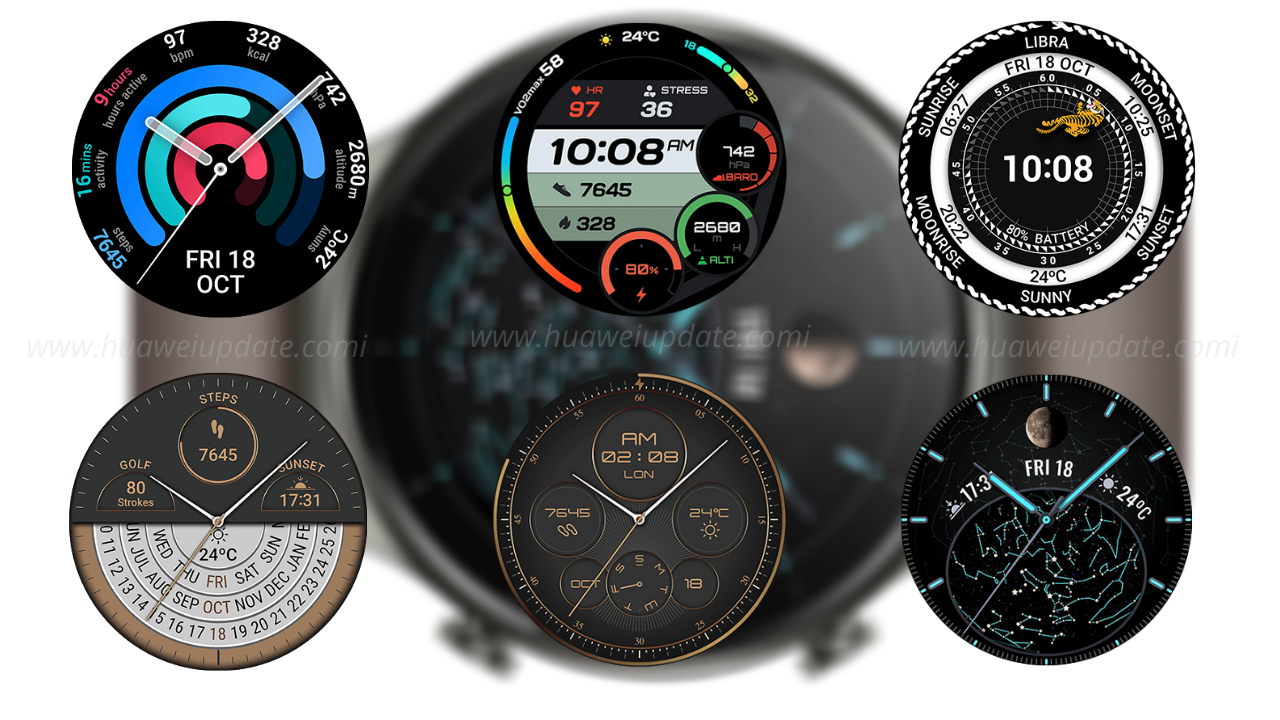
When you power on the watch for the first time, you can personalize its appearance by choosing one of the watch faces that come pre-installed. Touch and hold the home screen of the watch, then swype left or right to view the faces that are currently in the memory of the watch. To apply the one you choose, all you have to do is tap it.

Watch GT 2 Pro Face setup

You can add more watch faces or remove some from the memory of the watch in the Huawei Health app, after connecting the watch to your phone via Bluetooth. Right after turning on the watch, a notification appears on the phone that the HUAWEI Watch GT 2 Pro is ready to connect, and after giving the necessary permissions and initial setup, the watch appears in the Devices tab of the Huawei Health app.

Watch GT 2 Pro Face setup-1

When you tap Watch faces from Featured, you will see the watch faces divided in two sections: Recommended and Mine. When you touch one of the watche faces shown in the Mine section, its enlarged view with more detailed information will open, whereby touching Set as default you can apply it to the watch, and by touching the trash can icon you can delete it from the memory of the watch (except those pre-installed).

Tap Watch faces

New Watch Face

Pay attention to the watch face named Gallery – it is a watch face whose background you can adjust yourself with a photo from your Gallery or from the Camera. Touch + to choose a photo, select its best part, further adjust the Style and Layout, and save your custom watch face that you can now apply to the watch.

watch face named Gallery

In Mine section, you can also find an Installation manager, where you can track the installation process of the watch face you are adding to the watch, Purchase history, where all paid watch faces you purchased will be displayed, and Download History, with all free or paid watch the faces you have downloaded. There are around 200 Huawei Watch GT 2 Pro faces you can select any one of them.

Join the Huawei Update channel on Telegram for the latest updates.

Tags: HuaweiHuawei WATCH GT 2 ProWatch GT 2 ProWatch GT 2 Pro face

Related Posts

Huawei, IUCN, and Global partners highlight Nature Protection's latest technology
Honor Products

Huawei, IUCN, and Global partners highlight Nature Protection’s latest technology

June 6, 2023
Charger Port
Tips And Tricks

Fix a Broken Charger Port on your Smartphone

December 6, 2022
How to restore WhatsApp chat history in Huawei Mate 30 Series
Tips And Tricks

How to restore WhatsApp chat history in Huawei Mate 30 Series

December 5, 2022
WhatsApp online status tips
Tips And Tricks

Hide online status on WhatsApp, follow this simple tweak

October 8, 2022
Download Call Recorder App
Tips And Tricks

Download Call Recorder App for EMUI [v11.0.0.109]

October 8, 2022
Pairing Fails when connecting Huawei Watch GT 3 to My iPhone
Tips And Tricks

Pairing Fails when connecting Huawei Watch GT 3 to My iPhone

June 25, 2022

POPULAR NEWS

Huawei Health App Update

Huawei Health App Update 2026: New AI Features

July 15, 2026
Stable EMUI 12 2023

Updated EMUI 12 plan for Global users [January 2023]

January 19, 2023
Huawei EMUI 13 Eligible Devices

Huawei EMUI 13 Eligible devices for global market

March 22, 2023
Download and Install EMUI 10

Download and Install EMUI 10 on any Huawei phone

February 11, 2020
Huawei Music

Huawei Music Latest 2026 Update

May 28, 2026

EDITOR'S PICK

Huawei Health 12.0.11.355 wearBeta

Download Huawei Health 12.0.11.355 wearBeta

November 30, 2021
China Smartphone Sales Fall 5 percent YoY in Q1 2023

China Smartphone Sales Fall 5 percent YoY in Q1 2023

May 3, 2023
Honor MagicBooks power

See how Honor MagicBooks power the impossible

March 2, 2020
Honor 20 Youth Edition March 2022 patch

March 2022 patch for Honor 20 Youth Edition is now live

April 7, 2022

About

HUpdate brings you the latest Huawei news, HarmonyOS & EMUI updates, firmware releases, and device coverage — all in one place. Stay updated with accurate, timely Huawei tech news.

Categories

  • Android
  • Ark OS
  • Deal
  • EMUI
  • EMUI 10
  • EMUI 10 Timeline
  • EMUI 10.1
  • EMUI 11
  • EMUI 12
  • EMUI 13
  • EMUI 14
  • EMUI 9.1
  • Game
  • Guides And How-To
  • Harmony OS 2
  • HarmonyOS 3
  • HarmonyOS 4
  • HarmonyOS 5
  • Hongmeng
  • Honor Products
  • Huawei 5G
  • Huawei Apps Apk
  • Huawei Mobile Services
  • Huawei News
  • Huawei Phones
  • Huawei Weekly Report
  • Magic UI 3
  • Magic UI 3.1
  • Magic UI 4.0
  • News
  • Tips And Tricks
  • Uncategorized
  • Updates

Recent Posts

  • Huawei Health App Update 2026: New AI Features
  • Huawei Mate 90 Hardware Upgrades & INSPIRE 2026 Cloud News
  • MTN Zambia and Huawei, have teamed up to fix a big problem
  • Huawei & Angola Partner for Smart Grid Transformation & Green Energy
  • About Us
  • Privacy Policy
  • Sitemap
  • Send A Tip

© 2026 HUpdate

No Result
View All Result
  • Home
  • HarmonyOS
    • HarmonyOS History
  • EMUI Updates
    • EMUI History
  • News
  • Send A Tip

© 2026 HUpdate

Go to mobile version