


HU
No Result
View All Result
  • Home
  • HarmonyOS
    • HarmonyOS History
  • EMUI Updates
    • EMUI History
  • News
    Huawei Mate 80 Pro

    Huawei Mate 90 Hardware Upgrades & INSPIRE 2026 Cloud News

    MTN Zambia and Huawei

    MTN Zambia and Huawei, have teamed up to fix a big problem

    Huawei & Angola Partner

    Huawei & Angola Partner for Smart Grid Transformation & Green Energy

    Huawei Mate 90 news

    Huawei Mate 90 Series Sales Date: Flagship Timeline Revealed Early

    Huawei Nova 16 Ultra

    Huawei Nova 16 Ultra launched with 200MP camera and 7000mAh battery

    Huawei Maextro S800 ultra

    Huawei Maextro S800 ultra luxury sedan outsells Mercedes Maybach in China

    Huawei Keyrus

    Huawei partners with Keyrus to scale data and AI tools in global markets

    Huawei Logo Image - Credit Unsplash

    Huawei Ascend chips reach major milestone in new DeepSeek AI update

    Huawei Gartner 2026 image

    Huawei Named Leader in 2026 Gartner Wired and Wireless LAN Infrastructure Magic Quadrant

    Trending Tags

    • Mate 50
    • P40
  • Send A Tip
  • Home
  • HarmonyOS
    • HarmonyOS History
  • EMUI Updates
    • EMUI History
  • News
    Huawei Mate 80 Pro

    Huawei Mate 90 Hardware Upgrades & INSPIRE 2026 Cloud News

    MTN Zambia and Huawei

    MTN Zambia and Huawei, have teamed up to fix a big problem

    Huawei & Angola Partner

    Huawei & Angola Partner for Smart Grid Transformation & Green Energy

    Huawei Mate 90 news

    Huawei Mate 90 Series Sales Date: Flagship Timeline Revealed Early

    Huawei Nova 16 Ultra

    Huawei Nova 16 Ultra launched with 200MP camera and 7000mAh battery

    Huawei Maextro S800 ultra

    Huawei Maextro S800 ultra luxury sedan outsells Mercedes Maybach in China

    Huawei Keyrus

    Huawei partners with Keyrus to scale data and AI tools in global markets

    Huawei Logo Image - Credit Unsplash

    Huawei Ascend chips reach major milestone in new DeepSeek AI update

    Huawei Gartner 2026 image

    Huawei Named Leader in 2026 Gartner Wired and Wireless LAN Infrastructure Magic Quadrant

    Trending Tags

    • Mate 50
    • P40
  • Send A Tip
No Result
View All Result
HUpdate
No Result
View All Result
Home Tips And Tricks

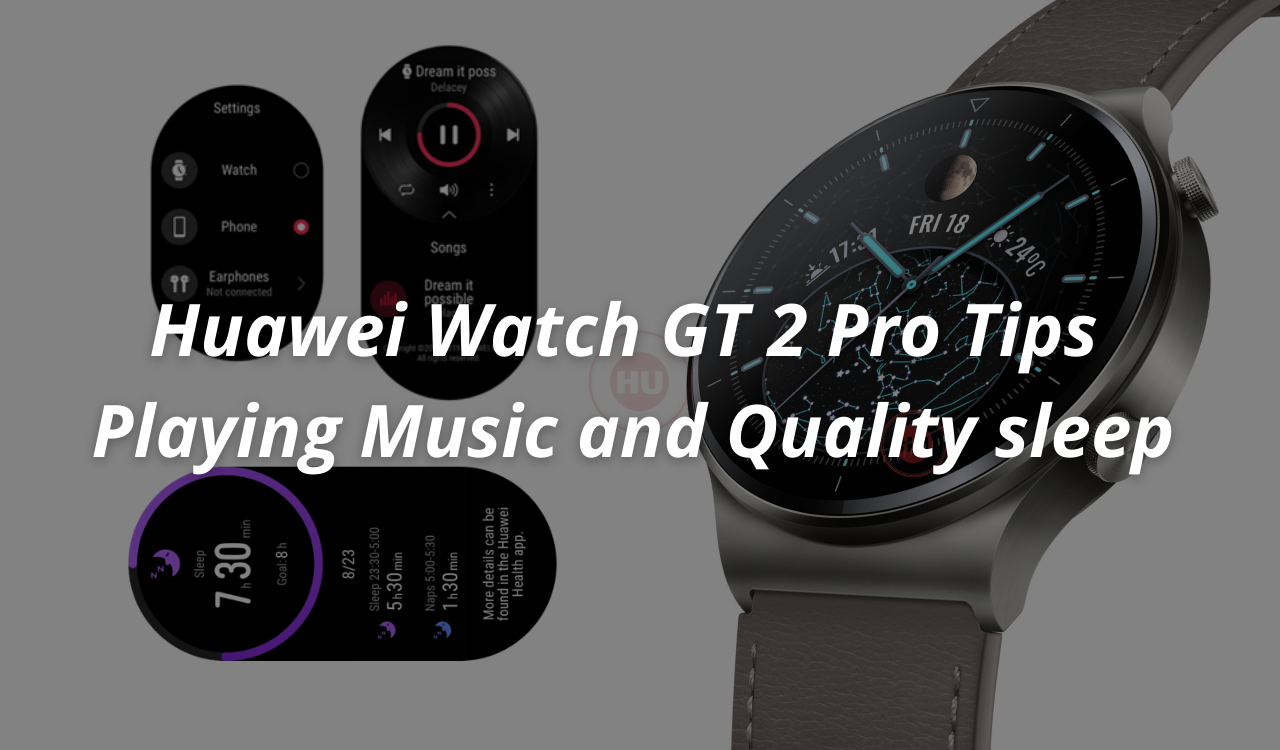
Huawei Watch GT 2 Pro Tips: Playing Music and Quality sleep

Comes with pre-installed 100 workout modes and more

Min by Min
April 20, 2022
in Tips And Tricks
0
Huawei Watch GT 2 Pro Tips Playing Music and Quality sleep

Huawei Watch GT 2 Pro Tips Playing Music and Quality sleep

230
SHARES
2.9k
VIEWS
Share on FacebookShare on Twitter

Huawei Watch GT 2 Pro boasts some significant upgrades over its predecessors, it has a 1.39-inch 454 x454 AMOLED display that is covered in scratch-resistant sapphire glass, the body is made from titanium, and the underside is ceramic.

There are a number of faces available to choose from and the company has also announced OneHop Watch Face. This feature allows you to take a picture with your phone and use it as a watch face just by touching the phone (Huawei models with NFC and running EMUI 11+) against the dial of the watch and you have a new watch face.

READ ALSO

Huawei, IUCN, and Global partners highlight Nature Protection’s latest technology

Fix a Broken Charger Port on your Smartphone

Now get back to the title of this article and check how to control music and get quality sleep on your Huawei Watch GT 2 Pro.

HUAWEI WATCH GT 2 Pro Music Control:

1. Open the HUAWEI Health app, touch Devices and then HUAWEI WATCH GT 2 Pro.

2. Scroll down to the Music section, choose Manage music and enable on-wrist control.

*This feature only works with phones that are running Android 4.4 or a later OS version.

**Third-party audio apps are supported.

***From your watch’s home screen, you can slide left or right to access the music control interface, then pause/resume playback or skip to the previous/next song.

Huawei Watch GT 2 Pro Playing Music Tips

Huawei Watch GT 2 Pro: Getting the quality sleep

The HUAWEI WATCH GT 2 Pro comes fitted with a custom sleep tracker, which is backed by the company’s proprietary TruSleepTM technology.

Here’s how you can track your sleep:

Just go to bed with your HUAWEI WATCH GT 2 Pro on your wrist!

Yes, that’s it – your watch will automatically detect when you have fallen asleep, track your sleep stages (such as REM, light and deep sleep), and sense when you have woken up – because HUAWEI TruSleep is enabled by default.

Join HU On Telegram

If you would prefer ordinary sleep tracking instead, all you need to do is open the HUAWEI Health app, go to Devices > HUAWEI WATCH GT 2 Pro, and toggle off HUAWEI TruSleep.

Here’s how you can view your sleep data:

Your current day’s sleep data, including naps, will be displayed on your watch’s Sleep section. Analysis is conducted according to a daily cycle that lasts from 8 p.m. on the precious day to 8 p.m. on the current day. The previous cycle’s data is cleared from the watch screen at midnight.

What makes HUAWEI TruSleepTM unique?

With HUAWEI TruSleep enabled, your WATCH GT 2 Pro is equipped to:

(1) Recognize sleep stages (incl. wake, REM, light sleep and deep sleep) with a high degree of precision, match your heart rate and breathing data to your sleep, and rate the overall quality of your sleep — that’s truly comprehensive monitoring.

(2) Distinguish between overnight sleep and daytime naps (of 3 hours or less each). Naps are added to the all-day sleep duration, but not included in the overnight sleep analysis.

(3) Collect precise data to ensure that your sleep is accurately accessed and scored, with personalized, evidence-based suggestions for improving sleep quality, such as meditation and light exercise prior to bedtime. (Only available on Android phones)

(4) Sync all of the information above to the Health app, where the data is cataloged for future reference. Given the sheer amount of data collected, synchronization can appear to be slow at times.

Ordinary sleep tracking, on the other hand:

(1) Collects wakeup times, as well as light and deep sleep data only (no REM stage). Your sleep won’t be scored.

(2) Treats all sleep data, including overnight sleep and daytime naps, as the same.

(3) Applies near real-time synchronization, due to the relatively small amount of data.

Huawei Watch GT 2 Pro Quality sleep Tips

Tags: Huaweihuawei tipshuawei tricksHuawei WATCH GT 2 ProTips and tricksWatch GT 2 ProWatch GT 2 Pro Tips

Related Posts

Huawei, IUCN, and Global partners highlight Nature Protection's latest technology
Honor Products

Huawei, IUCN, and Global partners highlight Nature Protection’s latest technology

June 6, 2023
Charger Port
Tips And Tricks

Fix a Broken Charger Port on your Smartphone

December 6, 2022
How to restore WhatsApp chat history in Huawei Mate 30 Series
Tips And Tricks

How to restore WhatsApp chat history in Huawei Mate 30 Series

December 5, 2022
WhatsApp online status tips
Tips And Tricks

Hide online status on WhatsApp, follow this simple tweak

October 8, 2022
Download Call Recorder App
Tips And Tricks

Download Call Recorder App for EMUI [v11.0.0.109]

October 8, 2022
Pairing Fails when connecting Huawei Watch GT 3 to My iPhone
Tips And Tricks

Pairing Fails when connecting Huawei Watch GT 3 to My iPhone

June 25, 2022

POPULAR NEWS

Huawei Health App Update

Huawei Health App Update 2026: New AI Features

July 15, 2026
Stable EMUI 12 2023

Updated EMUI 12 plan for Global users [January 2023]

January 19, 2023
Huawei EMUI 13 Eligible Devices

Huawei EMUI 13 Eligible devices for global market

March 22, 2023
Download and Install EMUI 10

Download and Install EMUI 10 on any Huawei phone

February 11, 2020
Huawei Music

Huawei Music Latest 2026 Update

May 28, 2026

EDITOR'S PICK

Huawei P40 Pro Screen Supplier

Huawei P40 Pro screen supplier leaked

March 19, 2020
Huawei MatePad Paper HarmonyOS 2 ink tablet

The first HarmonyOS 2 ink tablet Huawei MatePad Paper launched

March 16, 2022
Honor 8S With Dewdrop Notch, MediaTek Helio A22 SoC Launched

Honor 8S With Dewdrop Notch, MediaTek Helio A22 SoC Launched

April 28, 2019
Huawei Nova 9 EMUI 12.0.1.235

Huawei Nova 9 now receiving February 2022 patch update

May 16, 2022

About

HUpdate brings you the latest Huawei news, HarmonyOS & EMUI updates, firmware releases, and device coverage — all in one place. Stay updated with accurate, timely Huawei tech news.

Categories

  • Android
  • Ark OS
  • Deal
  • EMUI
  • EMUI 10
  • EMUI 10 Timeline
  • EMUI 10.1
  • EMUI 11
  • EMUI 12
  • EMUI 13
  • EMUI 14
  • EMUI 9.1
  • Game
  • Guides And How-To
  • Harmony OS 2
  • HarmonyOS 3
  • HarmonyOS 4
  • HarmonyOS 5
  • Hongmeng
  • Honor Products
  • Huawei 5G
  • Huawei Apps Apk
  • Huawei Mobile Services
  • Huawei News
  • Huawei Phones
  • Huawei Weekly Report
  • Magic UI 3
  • Magic UI 3.1
  • Magic UI 4.0
  • News
  • Tips And Tricks
  • Uncategorized
  • Updates

Recent Posts

  • Huawei Health App Update 2026: New AI Features
  • Huawei Mate 90 Hardware Upgrades & INSPIRE 2026 Cloud News
  • MTN Zambia and Huawei, have teamed up to fix a big problem
  • Huawei & Angola Partner for Smart Grid Transformation & Green Energy
  • About Us
  • Privacy Policy
  • Sitemap
  • Send A Tip

© 2026 HUpdate

No Result
View All Result
  • Home
  • HarmonyOS
    • HarmonyOS History
  • EMUI Updates
    • EMUI History
  • News
  • Send A Tip

© 2026 HUpdate

Go to mobile version